Per-Project AI Agent Harness: Side vs Production
I run side and production projects at once, so the workflow has to differ. Most harnesses are fixed, so I built one that generates a harness per project.
On this page
I run side projects and production projects at the same time. On one side I write a small log tool. On the other I build a product headed for commercial release. Both use AI agents like a team. But every time I tried to run the same setup on both, something was off.
The problem with a fixed harness
Most AI coding setups start from a generic template. You find a good AGENTS.md and copy it into every repo. It drifts from day one. A throwaway script and a production service get the same reviewers, the same gates, the same flow. One ends up over-gated, the other too loose.
The trouble shows up when you hold several projects with different characters. On a weekend log parser, if five reviewers pile onto every commit and a SPEC is demanded, you stall. On a production product with a single reviewer, what you missed surfaces only after it ships. Either way, the harness fights the project.
Side and production want different workflows
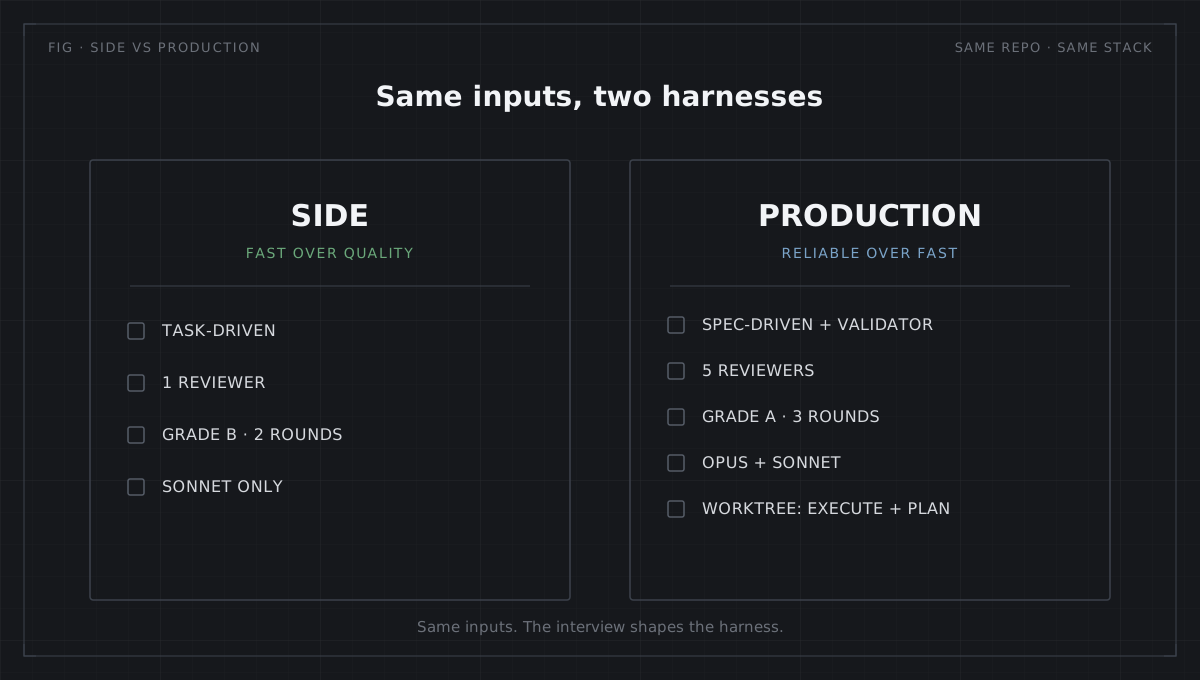
At some point I realized my workflow should differ between side and production.
On a side project, the thing that matters most is not quality but fast development. The point is to try an idea quickly, so a thick review pipeline is friction, not safety. There is no reason to sit waiting on a five-reviewer consensus.
A production project is the opposite. Reliable, high-quality work comes before speed. A shipped product is hard to undo. Here the gates are not friction, they are a safety net. I want those gates.
One fixed harness cannot satisfy both at once. Tune it for side and production goes loose. Tune it for production and side gets locked down.
Two levels are not enough
Side versus production is still too coarse. Every project wants a different level and a different taste.
One project wants its work notes saved to Obsidian automatically. One wants an extra review from just one of codex or antigravity, not both. One wants worktree isolation, and one wants a feature branch by default.
There is no single right answer to these. It depends on the project’s risk and the shape of the team. A fixed bundle makes that decision for me in advance, usually the wrong way for my project.
One flow, six stages
The development flow harness-maker espouses is six stages. It opens at research, moves through plan, execute, review, verify, and closes at wrapup. Each stage has to clear its own gate before the next one runs.
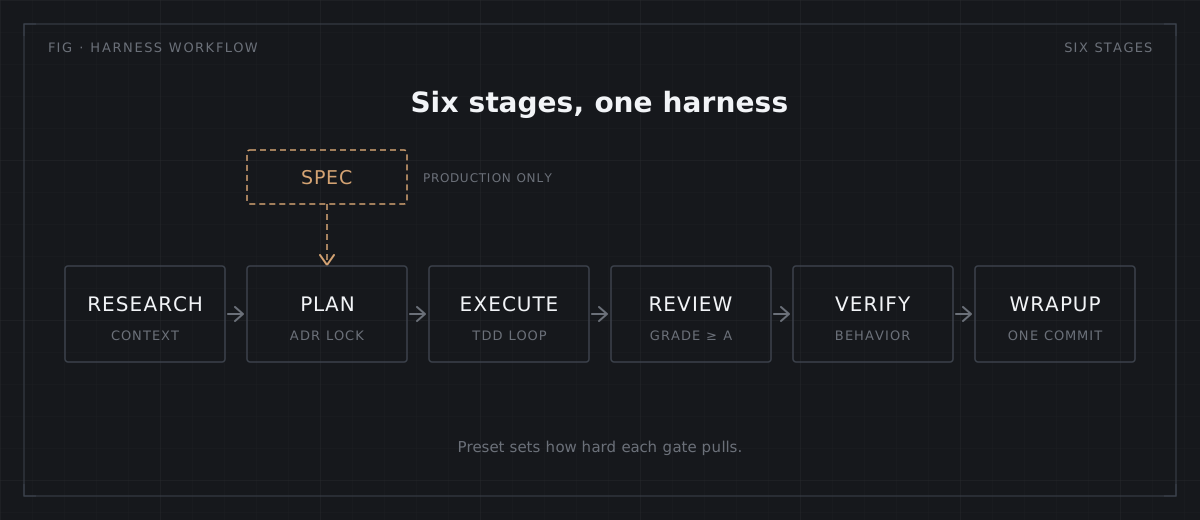
What the preset decides is where in that flow the gates sit and how hard they pull. Production adds a SPEC gate before plan and walks all six stages, which is the spec-driven loop I run on embedded work. Side skips that gate and moves through lightly.
Same tool, different harness
Two of my own projects show it. log_agent is a small Python log tool I write alone, so I picked the Side preset. spoton is a project headed for commercial release, so I picked Production. Same me, same base stack, but the harness.yaml answered different questions and the workflow splits like this.
| Dimension | Side · log_agent | Production · spoton |
|---|---|---|
dev_mode | task-driven | spec-driven |
| Agent model | sonnet | opus + sonnet |
| Active reviewers | 1 | 5 |
| Review grade bar | B | A |
| Review rounds | 2 | 3 |
| worktree scope | [execute] | [execute, plan] |
| Cross-model review | none | yes (codex etc.) |
None of these are hand-tuned. They came from the interview each project answered once, and they re-render deterministically. The log tool runs fast on one reviewer and sonnet. The commercial project bumps the reasoning agents to opus and locks to grade A with five reviewers (code, security, performance, ux, concurrency), a feature branch worktree, and cross-model review (codex, antigravity).
It reads the repo, and keeps its shape
The tool reads the project first. It looks at 12+ stack and CI signals, locks the rest with a 10-dimension interview, then renders a harness that fits. It does not quietly ship generic defaults. On the production side the reviewers are read-only, so they cannot touch code directly, and mechanical checks like lint and tests gate the LLM reviewer before a token is spent, the same verification gate I put in front of AI-written firmware. On a side project you just shave those gates down.
The harness also keeps its shape as the project moves. Edit an agent or a CLAUDE.md by hand and the @hm:user:* markers carry that edit across a re-render. Memory accumulates project-specific patterns and proposes new guardrails for recurring failures. All of it renders from one harness.yaml to Claude Code, Cursor, and Codex.
Generate, don’t copy
A static template gives you a starting point. harness-maker gives you a starting point that knows who it was created for, and one that updates without losing your edits. A good harness is not the same starting point for everyone. It grows out of each project.
I stopped keeping one personal master setup. The side project runs fast the way a side project should, and the production project runs solid the way a production project should. What vanished was the chore at the start of every new repo: copy the last project’s CLAUDE.md, then trim the reviewers and gates that did not fit. The interview does that now.
The tool is at github.com/Ecro/harness-maker. The full render evidence and how to reproduce it is in the showcase diff.

Comments
Loading comments...