Hardware Docs for LLMs: grep vs RAG
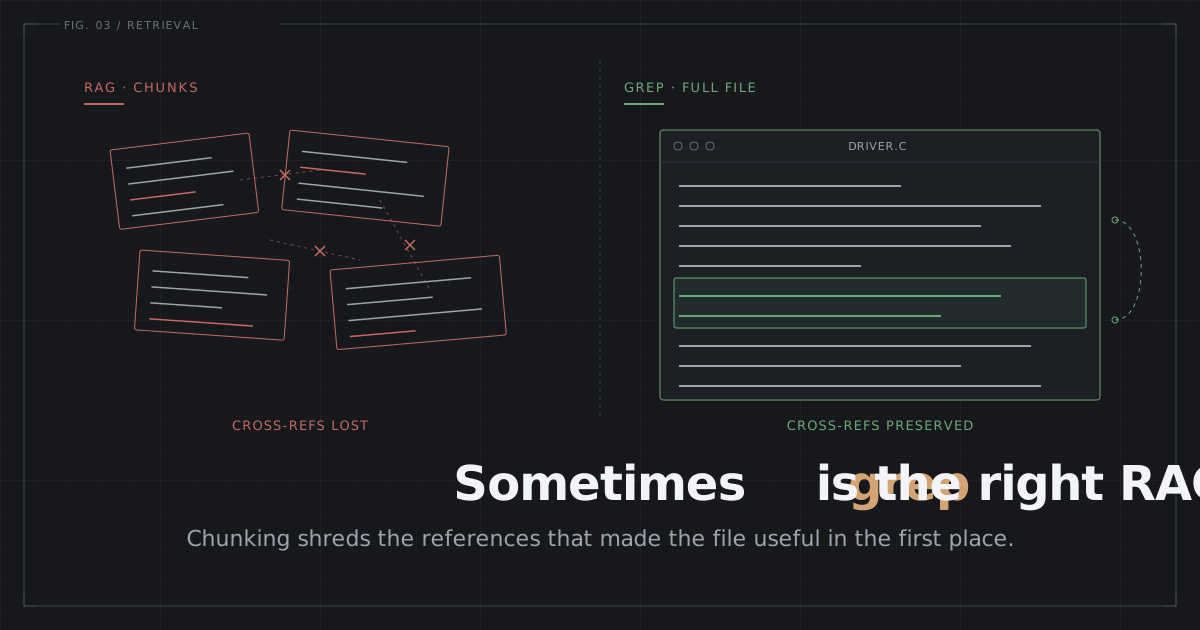
RAG destroys the cross-references that make hardware docs useful. Skip the pipeline: give the LLM your SVD and PDF as file tools.
On this page
- When grep wins, when RAG wins
- Why RAG Breaks on Hardware Docs
- The USART Baud Rate Bug
- You Don’t Need RAG. You Need File Access.
- Why Tool Access Beats Full Context
- How the Agent Solves the Baud Rate Bug
- Setting It Up
- Minimal setup
- What the agent still gets wrong
- What This Doesn’t Cover
- Skip RAG. Use the Files.
I asked Claude to set up USART2 for 9600 baud on an STM32F407. The code compiled fine. The serial terminal just spat out garbage.
The problem wasn’t the LLM’s reasoning. It was retrieval. The USART baud rate formula references the peripheral clock frequency, and that value lives in a completely separate chapter from the USART registers. My RAG pipeline pulled in one chapter and missed the other. The LLM papered over the gap by inventing a clock frequency.
I spent two weeks wrestling with a proper RAG system just for RM0090: Docling for PDF parsing, ChromaDB for hybrid search, a routing layer on top. Then it hit me, a little deflating: I could have just handed the LLM the file paths and let it grep.
When grep wins, when RAG wins
The rest of this post is the case against RAG for hardware docs. Before that, the boundary, because it is narrower than “RAG is bad.”
| Situation | What to use |
|---|---|
| A handful of docs, cloud LLM, large context window | grep and read, as file tools |
| Air-gapped or local model with a small context window | retrieval, built around the document structure |
| Dozens of datasheets, “which MCU has X” queries | an index of some kind, not necessarily RAG |
Row one is what most firmware work looks like, and it is what the rest of this post is about. Row two is a real constraint I hit later on an air-gapped factory network, and it needed a retrieval pipeline rebuilt for datasheets. The deciding variable is not document type. It is whether you can put the pages in front of the model at all.
Why RAG Breaks on Hardware Docs
Most RAG research tests on the wrong documents in the first place. LaRA (Feb 2025, 2,326 test cases) covered novels, academic papers, and financial statements. Self-Route (Jul 2024) threw NLP papers, multi-field documents, and multi-hop QA benchmarks at it. The Databricks study ran 2,000 experiments on product docs, financial, and general QA datasets. Not one of them tests on hardware documentation, where the failure modes are structurally different from the ground up.
Chunking destroys cross-references. RM0090 Section 30.3.4 holds the baud rate formula. The clock frequency that formula needs sits in Section 7.2, hundreds of pages away. Standard RAG retrieves chunks independently of each other. The Late Chunking paper (Sep 2024) pinned down exactly this problem: phrases that lean on earlier context produce badly degraded embeddings once you chunk them. In hardware docs, “this register” pointing back to a definition three chapters earlier is routine.
Embedding models can’t index register tables. A description like RCC_CFGR[SWS]: bits 3:2, read-only crams enormous meaning into 15 tokens. Embedding models trained on natural language hand these entries stingy similarity scores. Ask “what clock source is the MCU using?” and cosine similarity won’t surface the SWS field.
A wrong bit position is not “roughly correct.” If a system hands back bit 13 where bit 12 belongs, the code writes to the wrong register field and the peripheral just sits there dead. RespCode (2026) documented this across four LLMs. Gemini hallucinated SYSCON_BASE 0x50000000 for the LPC55S69 (the correct value is 0x40000000). 3 of the 4 models got the CTIMER2 clock enable bit wrong. All four compiled cleanly under arm-none-eabi-gcc. And none of them ran on real hardware.
The LlamaIndex benchmark measured this gap head-on. On a small bundle of research papers (5 documents, 22-52 pages each), a filesystem agent (grep + read) scored 8.4/10 for correctness while RAG landed at 6.4/10. Their own explanation: “RAG is bound to context loss due to chunking and sub-optimal retrieval calls, so the LLM generating the final answer has access to limited, sometimes incorrect context.”
Hardware docs make every one of these worse. The information density is higher, the cross-references hold up the structure itself, and the tolerance for error is zero.
The USART Baud Rate Bug
This one example holds everything that goes wrong when RAG meets hardware docs.
I asked for USART2 on an STM32F407 at 168MHz: 9600 baud, 8N1, RX interrupt. RAG grabbed the baud rate register description from RM0090 Section 30.3.4, USARTDIV formula attached. What it missed was the RCC configuration in Section 7.2, the part showing that USART2 hangs off APB1 at SYSCLK/4 = 42MHz. The LLM did see f_CK in the formula, but with no chunk telling it what f_CK actually is for USART2, it just guessed.
// What RAG generated (WRONG - assumes f_CK = 168MHz)
USART2->BRR = 168000000 / 9600;  // BRR = 17500

// Correct (f_CK = 42MHz for APB1 peripherals)
USART2->BRR = 42000000 / 9600;   // BRR = 4375
// Simplified formula for 16x oversampling (OVER8=0, default).
// Full: Baud = f_CK / (8 * (2 - OVER8) * USARTDIV). RM0090 Section 30.3.4.
Compiles. Runs. Then you connect at 9600 baud and garbage pours out. It’s the kind of bug that eats hours because the code looks perfectly fine.
No amount of chunk-size fiddling fixes it. The baud rate formula and the clock tree are scattered across different chapters. Cosine similarity can’t co-retrieve “USART baud rate” and “RCC APB1 prescaler” because the two pieces of text are total strangers semantically. This isn’t a tuning problem. It’s a structural one.
You Don’t Need RAG. You Need File Access.
The answer is not a slicker RAG pipeline. What you want is to open your documentation files for the LLM to touch directly and let it search them on demand.
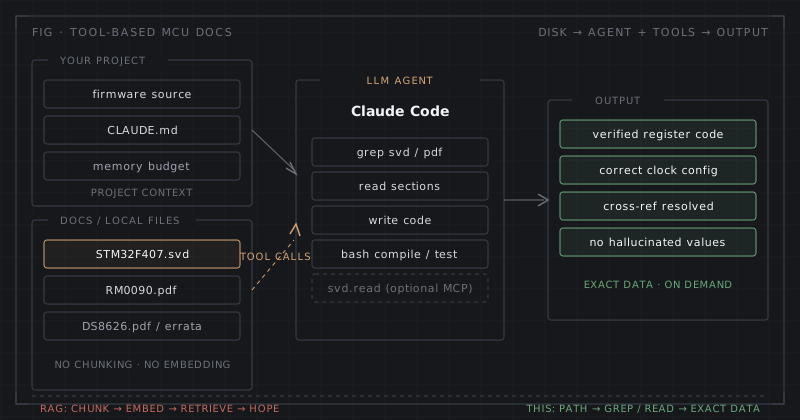
Architecture: the agent greps SVD and PDF files on demand instead of retrieving pre-chunked embeddings.
Two files cover almost everything a firmware engineer needs.
SVD (System View Description): Every ARM Cortex-M silicon vendor ships one of these XML files. It holds all the peripheral registers, base addresses, bit fields, reset values, and enumerated values for your specific MCU. The STM32F407 SVD alone runs past 1,000 register definitions across 58 peripherals. The cmsis-svd-data repository gathers SVDs from a range of vendors in one place. RespCode parsed 2,177 SVD files, and once they injected the SVD, LLM accuracy on register value lookups jumped from a ~25% baseline to 100% on the tested fields.
PDF reference manual: RM0090 for the STM32F407 runs past 1,700 pages, covering everything from the clock tree to peripheral behavior, timing diagrams, initialization sequences, and electrical characteristics. The procedural knowledge all lives here: how to bring up DMA, what breaks when you touch a prescaler, which GPIO alternate function maps to which peripheral.
The LLM doesn’t need these files crammed into its context window. What it needs is tool access: grep to dig through them, read to pull only the relevant section. Claude Code (I covered its embedded Linux workflow in the embedded Linux AI agents post), Cursor, and tools like them already have this built in. You just point them at the files.
Why Tool Access Beats Full Context
Stuffing the whole reference manual into the context window is an option too, but it costs more than it’s worth. RM0090 is roughly 1.5M tokens. At Gemini 2.5 Pro pricing (long context at $2.50/M input tokens), a single query runs about $3.75. Drop down to Gemini 2.5 Flash-Lite ($0.10/M) and you’re still at $0.15 per query, plus a 30-60 second wait for the O(n^2) attention computation.
Tool-based access reads only as much as it needs. A typical query touches something like 20-50K tokens of SVD data and PDF sections. That’s 30-75x fewer tokens per query. Instead of swallowing one giant context whole, the LLM does several small reads, and each read is aimed by the LLM’s own search logic.
The table below lines things up using Claude Sonnet 4.6 pricing ($3/M input, as of March 2026). In practice, loading the full context means you need Gemini’s 1-2M context window.
| Approach | Tokens per query | Est. cost | Latency | Accuracy |
|---|---|---|---|---|
| RAG (chunked) | ~3K | ~$0.01 | 1-2s | Low on cross-peripheral |
| Full context | ~1,500K | ~$4.50 | 30-60s | High but expensive |
| Tool access (grep+read) | ~20-50K | ~$0.06-0.15 | 10-20s | High |
The cost estimates are based on published API pricing and rough token counts. The tool access numbers assume 3-5 read/grep rounds per query.
The LlamaIndex benchmark points the same way. On small documents, agentic file search beat RAG by 2 points on correctness (8.4 vs 6.4). Those were research papers rather than hardware docs, yet the direction holds, and on hardware docs with their dense cross-references the gap would likely widen.
How the Agent Solves the Baud Rate Bug
With tool access, that same USART2 query plays out completely differently. The agent greps the SVD for USART2 and BRR:
<!-- grep result from STM32F407.svd -->
<peripheral>
  <name>USART2</name>
  <baseAddress>0x40004400</baseAddress>
  ...
  <register>
    <name>BRR</name>
    <addressOffset>0x08</addressOffset>
    <size>0x20</size>
    <fields>
      <field><name>DIV_Mantissa</name><bitOffset>4</bitOffset><bitWidth>12</bitWidth></field>
      <field><name>DIV_Fraction</name><bitOffset>0</bitOffset><bitWidth>4</bitWidth></field>
    </fields>
  </register>
</peripheral>
Now the exact register address and field layout are in hand. The agent reads the PDF section on USART baud rate and sees f_CK in the formula. Rather than guessing, it greps the PDF for “APB1” and “USART2” and lands on Section 7.2 with APB1 = SYSCLK/4 = 42MHz. Three tool calls. The right answer.
RAG can’t do this. Cosine similarity won’t follow the cross-reference. The agent reasons about what to search next from what it just found, so it follows the reference all the way through.
Setting It Up
Minimal setup
Download your MCU’s SVD file from cmsis-svd-data, and grab the reference manual PDF from the vendor site. Drop both into your project’s docs/ folder. Then add this to your CLAUDE.md (or whatever your project context file is):
## Hardware Reference
- Target: STM32F407VG (Cortex-M4, 168MHz)
- SVD: docs/STM32F407.svd (register definitions, bit fields, addresses)
- Reference Manual: docs/RM0090.pdf (peripheral behavior, clock tree, init sequences)
- Datasheet: docs/DS8626.pdf (pinout, electrical characteristics, absolute max ratings)

When writing register-level code, always grep the SVD file for exact
register addresses and bit field definitions. Do not guess register values.
For clock configuration, read RM0090 Section 7 (RCC).
That’s the whole setup. The agent now reads the same documentation you’d have open in a PDF viewer, except it searches it programmatically.
What the agent still gets wrong
For popular MCUs like STM32, ESP32, and nRF52, the LLM has already seen most of the relevant documentation in its training data. It often nails the register configuration with no documentation at all. In those cases the SVD file is less a primary source and more a verification layer.
Where documentation access really decides things is elsewhere: minor or niche MCUs the LLM has never seen, recent silicon revisions where the register layout got reworked, vendor-specific errata. In those situations RAG would have to ingest the documents anyway. Tool access just handles them, no preprocessing pipeline required.
What This Doesn’t Cover
Large-scale retrieval across many documents. Lay out 50 datasheets and ask “which MCU has a CAN-FD peripheral with at least 64 message buffers,” and tool-based grep does get sluggish. That’s where a lightweight index helps (it doesn’t have to be RAG). But this is a product selection query, not a firmware development query. Different problem entirely.
Diagrams and schematics. Tool-based PDF access handles this better than you’d expect. Claude and Gemini process PDF pages as images, so the agent can read a specific page and interpret block diagrams, clock tree figures, and pin assignment tables by sight. The tool pattern is identical: the agent greps the PDF for “Figure 23,” reads that page, and pulls out what it needs.
Timing diagrams are a different story. General-purpose VLMs still flounder on multi-signal waveform interpretation. GPT-4o misreads signals and misses protocol-specific transitions like AHB wait states. TD-Interpreter (July 2025) fine-tuned a vision-LLM purely for timing diagrams, hit expert-level accuracy, and beat GPT-4o, but it takes custom training on synthesized timing diagram data. On the MMMU multimodal benchmark (which spans 30 subjects, engineering diagrams included), earlier-generation VLMs scored 60-70% against human experts at ~89%. Newer models are narrowing the gap, but they still trail on timing diagrams. The harder MMMU-Pro variant drops the scores further. For setup/hold times and protocol timing, you still have to read the numbers off the datasheet yourself.
Validation. Handing the LLM the right documentation doesn’t guarantee the right code. Validating after generation against the SVD database, the way RespCode does it, catches the errors the LLM makes even with perfect context. That’s a separate problem from retrieval.
Skip RAG. Use the Files.
RAG was built for natural language documents where approximate retrieval is good enough. Hardware documentation isn’t that kind of document. Register addresses, bit fields, clock trees, and cross-peripheral dependencies demand exact retrieval with the full context kept intact.
The simplest fix is also the best one: put the SVD and PDF files in your project, tell the LLM where they are, and let it grep. No embedding pipeline, no vector database, no chunk-size tuning. The files are the ground truth. Let the agent read them.

Comments
Loading comments...