Offline Datasheet RAG: What Survived the Pipeline
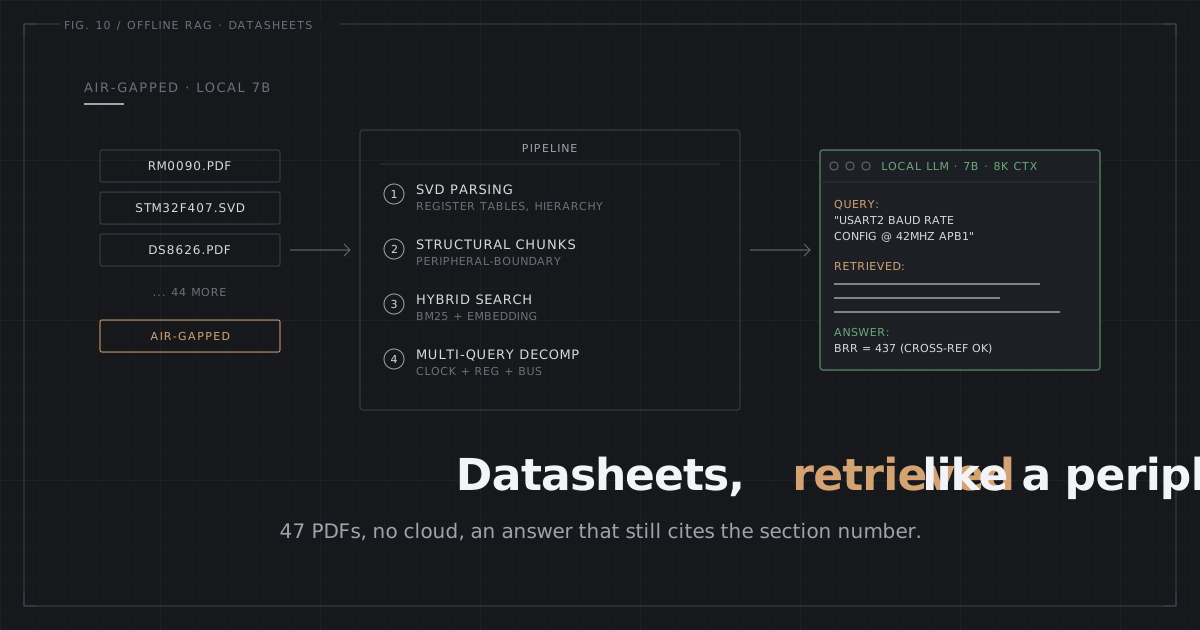
Default RAG breaks on hardware docs. Here is the pipeline that works offline: SVD parsing, structural chunks, hybrid search, multi-query decomposition.
On this page
I wrote a whole post on grep vs RAG for hardware docs telling you to skip RAG and just use file tools. I still think that’s right for a small doc set with a cloud LLM. Grep and read win. Then a job landed on my desk: search 47 datasheets on an air-gapped factory network. No Claude API. No Gemini. Just a local 7B model, 8K of context, and no way out to the internet.
Grep across 47 PDFs returns hundreds of hits for a common term like “clock” or “prescaler.” An 8K window can’t hold that many. So I needed retrieval, and I had no cloud API to lean on.
So I built the exact RAG pipeline I’d spent the last post arguing against. Most of it failed the way I expected. The pieces that survived had one thing in common. They were built for register tables and cross-references, not for blog posts and novels.
Ingestion: Parse the Structure Before You Chunk It
Every RAG tutorial opens with “load your PDFs.” That’s the exact step where hardware docs part ways with everything else.
PDF text extraction turns this register map from RM0090:
USART_BRR  Offset: 0x08  Reset: 0x0000
Bits 15:4   DIV_Mantissa   Mantissa of USARTDIV
Bits 3:0    DIV_Fraction   Fraction of USARTDIV
into something like:
USART_BRR Offset: 0x08 Reset: 0x0000 Bits 15:4 DIV_Mantissa
Mantissa of USARTDIV Bits 3:0 DIV_Fraction Fraction of USARTDIV
The column alignment is gone. Where there used to be a table, the embedding model now sees word salad. Chunk that with 512-token fixed windows and you can split DIV_Mantissa clean off from its bit range.
Two changes did most of the work.
Table detection on PDF text. Before you chunk anything, scan for whitespace-aligned columns and rewrite them as markdown pipe tables. Register maps, pin tables, electrical spec tables: they all follow predictable column patterns. Reformatting to | Field | Bits | Description | carries the structure intact through chunking and embedding. That bought me more retrieval accuracy than any model swap I tried.
SVD parsing. Every ARM Cortex-M vendor ships SVD files. They’re XML, one entry per peripheral register with its base address, bit fields, and reset value. I parse them into structured markdown:
## USART2 (0x40004400)
### BRR (offset: 0x08)
| Field        | Bits  | Reset | Description             |
|--------------|-------|-------|-------------------------|
| DIV_Mantissa | 15:4  | 0x000 | Mantissa of USARTDIV    |
| DIV_Fraction | 3:0   | 0x0   | Fraction of USARTDIV    |
Put that next to the garbled PDF extraction above. Register-address retrieval went from ~60% on PDF-only chunks to 100% on SVD chunks. RespCode ran four LLMs on register lookups and landed in the same place. SVD injection pushed all four to 100%. SVD is the single highest-impact input you can add to a hardware RAG pipeline.
SVD doesn’t replace the PDF, though. The reference manual still owns the initialization sequences, the timing constraints, the clock tree behavior. But when the question is “what address is this register” or “what bits do I set,” SVD is ground truth.
Chunking: Give Each Chunk a Location
Standard RAG chunks at a fixed token count. On hardware docs that runs into two problems.
A chunk full of APB1 prescaler bit descriptions looks identical whether it came out of the RCC chapter or the USART chapter. The embedding has no clue where the chunk sits in the document, so it can’t stitch related pieces together across chapters.
The fix is to stamp each chunk with its location in the document hierarchy before embedding it.
[Document: RM0090.pdf]
Section: RCC > Clock configuration > APB1 prescaler

The APB low-speed prescaler (APB1) configures the APB1 clock
frequency. Bits 12:10 of RCC_CFGR set the division factor...
Now the heading path ties the embedding to “RCC” and “clock configuration.” On my 20-query test set against RM0090, cross-reference retrieval accuracy climbed from 35% to 65%.
The second problem is chunk size, and it’s a lose-lose. Small chunks retrieve precisely but drop the surrounding context. Large chunks keep the context but wash out the embedding. So I index small, around 256-512 tokens, for tight search hits, then expand each hit to pull in its neighbors at query time. You get the exact register description that matched, plus the intro paragraph and the notes sitting around it.
Search: Hybrid Vector + Keyword
Pure vector search falls apart on register notation. Run “what clock source is the MCU using?” against a chunk that holds RCC_CFGR[SWS]: bits 3:2, read-only and the similarity score sits near zero. Embedding models learned natural language, not register shorthand.
None of the embedding models I tried (I ran three that fit on CPU) pulled register definitions out of natural-language queries with any reliability.
Hybrid search fixed it. You combine vector similarity with full-text keyword search and merge the results from both sides. The keyword half catches what the embeddings miss. Search “SPI1_CR1 CPOL” and the keyword index lands the exact chunk even when the embedding model scores it low. Keyword search is exact. The term is in the chunk or it isn’t.
Two tweaks that helped:
Acronym boost. Queries carrying uppercase terms (SPI, UART, DMA) get extra weight on the keyword side. Hardware questions lean hard on acronyms, and keyword search nails them. A one-line change pushed the hit rate on register queries from 72% to 81%.
Peripheral-aware scoping. Spot peripheral names in the query (UART1, SPI2, TIM3) and boost chunks whose heading path names that peripheral. “USART2” pulls chunks filed under “UART” headings. Keep it a soft boost rather than a hard filter, so cross-peripheral results still make it through.
Across 20 register-lookup queries, hybrid search with peripheral boosting hit 85% accuracy. Vector-only search hit 52%.
One practical note. I keep every embedding in SQLite through sqlite-vec. It pages to disk, so the whole embedding set for 47 datasheets never has to live in RAM. On an 8GB box that’s already running a 7B model, that matters.
Multi-Query Decomposition for Cross-Peripheral Questions
The USART baud rate bug from the grep vs RAG post still broke everything above it. A single query for “USART baud rate” grabs the BRR register and never once finds the APB1 clock prescaler buried in a different chapter. The two terms are semantically miles apart. No amount of embedding or keyword tuning wires them together.
The fix: before you search, hand the question to the local LLM and have it break the thing into sub-queries. “Configure USART2 at 9600 baud on STM32F407” turns into:
- USART2 BRR register configuration
- APB1 bus clock frequency
- RCC prescaler settings for APB1
Run each sub-query through hybrid search, then merge and dedupe. Three retrievals where one had failed.
On 10 cross-peripheral test queries, single-query retrieval scored 30%. Multi-query hit 80%. Every bit of that gain came from queries spanning two peripherals, the ones where the model needs the register plus the clock or the interrupt source.
The cost: 2-3x the search lookups plus one extra LLM call, roughly 1-2 seconds on a 7B model. With an 8K context window, top-2 results per sub-query (6 total) beat top-3 (9 total, which drags in too much noise).
What Still Breaks
Deep dependency chains. Multi-query handles a 2-hop query fine (register + clock source). Plenty of embedded queries chain deeper than that. “Set up DMA for USART2 RX” wants the DMA stream mapping table, the interrupt vector assignment, and the NVIC priority configuration. That’s three hops, and the LLM can’t guess them upfront because each one depends on the result of the last. This calls for iterative retrieval (search, read, search again), a different architecture altogether. For now I drop the hints in by hand.
Timing diagrams. The pipeline is text-only. Most of the critical timing parameters also show up in tables, and the table detection grabs those. What gets lost is the signal ordering and the edge relationships living in waveform diagrams. A vision-capable local model would help, but it wants another 4-5GB of RAM.
Niche MCUs. When the embedding model has never laid eyes on “SAMD21 GCLK” or “GD32F450 ENET,” vector search degrades. The keyword component picks up the exact matches as a fallback.
The Setup That Survived
The stack: nomic-embed-text-v1.5 for embeddings (CPU, no GPU needed), SQLite with sqlite-vec for vector storage, FTS5 for keyword search, and any 7B+ GGUF model for generation and query decomposition. It fits in 8GB RAM.
This pipeline runs inside NeuroTerm, the tool I’m building.
If you’re starting from zero, parse the SVD files first. That one change gave me the biggest accuracy jump I saw, from ~60% to 100% on register lookups, and it landed before I’d touched chunking or search at all. Grab your MCU’s SVD from cmsis-svd-data, convert it to structured markdown, and index it. Everything else in this post is optimization stacked on that foundation.
Your Turn
Want this running over your own datasheets? Paste the goal into Claude Code’s /goal and keep the spec in your repo. The constraints are the whole point: offline, 8GB, 8K context. Hit those three and the pipeline below is what’s left standing.
Goal: Build an offline RAG over a folder of MCU datasheets + SVD files that runs
on an 8GB machine with no internet and a local 7B GGUF model. Done when, on a
20-query register-lookup set, SVD-backed register-address lookups return 100%
correct addresses, hybrid search hits at least 85% retrieval accuracy, and on a
10-query cross-peripheral set multi-query decomposition hits at least 80% -- with
no cloud API call anywhere in the pipeline.
Spec (constraints first):
- Offline / air-gapped: no cloud LLM or embedding API, ever.
- 8GB RAM shared with a running 7B model; embeddings page to disk, not RAM.
- 8K context: retrieve few, tight chunks (top-2 per sub-query beat top-3).
- CPU-only embeddings, no GPU.
Requirements:
- Parse vendor SVD (XML) into structured markdown register tables first.
- Detect whitespace-aligned tables in PDF text, convert to markdown pipe tables.
- Prepend each chunk's document/section heading path before embedding.
- Index small (256-512 tokens); expand each hit to its neighbors at query time.
- Hybrid retrieval: vector similarity + FTS5 keyword, merged. Boost uppercase
acronyms and chunks whose heading path matches a peripheral named in the query.
- Multi-query: ask the local model to split a cross-peripheral question into
sub-queries, run each through hybrid search, merge and dedupe.
Non-goals:
- Vision / timing-diagram parsing (text-only pipeline).
- Iterative 3+ hop retrieval (add hints manually for now).
Acceptance:
- Register-address lookups 100% with SVD chunks (vs ~60% PDF-only).
- Hybrid + peripheral boost at least 85% on 20 register queries (vs 52% vector-only).
- Multi-query at least 80% on 10 cross-peripheral queries (vs 30% single-query).
Implementation Plan:
1. SVD to structured markdown (from cmsis-svd-data). Exit: register-address lookups 100%.
2. PDF table detection to markdown tables. Exit: register tables survive chunking.
3. Heading-path-prefixed chunking, small chunks + neighbor expansion. Exit: cross-ref queries up from ~35%.
4. Hybrid vector (nomic-embed-text-v1.5) + FTS5, SQLite/sqlite-vec storage, acronym + peripheral boost. Exit: at least 85% on register queries.
5. Multi-query decomposition, top-2 per sub-query. Exit: at least 80% on cross-peripheral queries.
Stack: nomic-embed-text-v1.5 (CPU), SQLite + sqlite-vec, FTS5, any 7B+ GGUF model. Fits 8GB RAM.
Starter prompt: "Build the pipeline in the spec, phase by phase. Start with phase 1
(SVD to structured markdown) and do not proceed until its exit check passes."
Comments
Loading comments...